


Employee Access Control Management in Irvine: Installation Costs
The cost isn’t determined by the door alone. For employee access control management in Irvine, installation costs depend on the number and layout of access points, credential types, wiring requirements, and whether the system connects with cloud tools, alarms, or video surveillance. Pricing is based on the project scope and provided after a quote request.
Installation is important, but it’s only one part of the decision. Credential management, employee onboarding, training, and ongoing support all affect how well a system fits daily operations.
This guide explains the factors that shape installation costs without relying on a one-size-fits-all figure. You’ll learn how mobile, RFID, keypad, and biometric credentials compare, what cloud-based management can change, and what to consider when assessing access points, planning installation, training employees, and arranging support.
Table of Contents
How much does it cost to install an access control system?
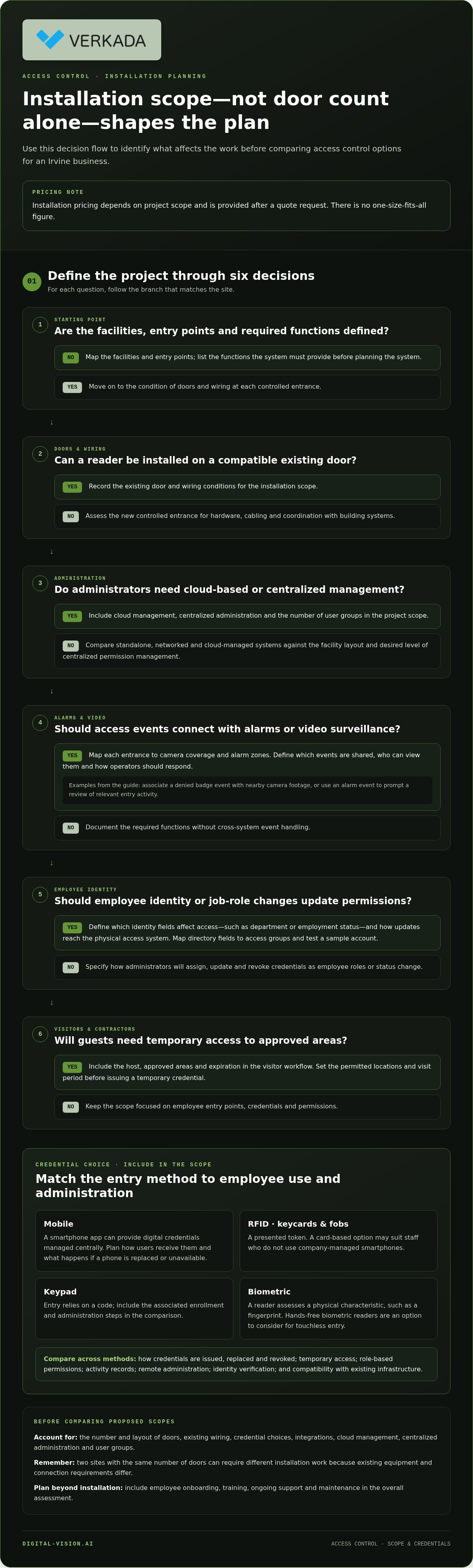
Installation pricing depends on the project scope and is provided after a quote request. Key factors include the number and layout of doors, existing wiring, credential choices, and integrations. For employee access control management in Irvine, define the facilities, entry points, and required functions before planning the system.
Two sites with the same number of doors can require different installation work. A reader installed on a compatible existing door differs from a new controlled entrance that needs hardware, cabling, and coordination with building systems. Cloud management, centralized administration, and the number of user groups also affect the scope.
Integrating access control with alarms and video surveillance can help coordinate events across facilities. For example, a denied badge event can be associated with nearby camera footage, while an alarm event can prompt operators to review relevant entry activity. Plan which events are shared, who can view them, and how operators should respond.
Camera placement and alarm connections affect the work involved. Map each controlled entrance to its camera coverage and alarm zone, then document how the systems exchange event information. Access control solutions can integrate with these systems, but existing equipment and connection requirements determine the installation approach.
Corporate identity management can link employee status and job roles to access permissions. Define which identity fields affect access, such as department or employment status, and how updates reach the physical access system. This can reduce duplicate administration when an employee changes roles or leaves.
An employee directory can provide a structured source for names, departments, and active status. Map those fields to access groups, then test a sample account before applying changes more broadly. For example, a facilities employee and a reception employee may need different door permissions based on their duties.
Visitor management integration links a guest’s visit record to temporary entry permissions. Include the host, approved areas, and expiration in the visitor workflow. For example, a scheduled contractor could receive access only to the designated work area during the approved visit.
California requirements depend on what the system records, including identifiable access logs, video, and biometric data. Define the monitoring purpose, limit access to records, and establish retention practices. Have California counsel review policies involving employee monitoring or biometric access.
Installation requirements in Irvine depend on the building and the work involved. Before installation, determine whether the project changes doors, electrical wiring, or fire-safety pathways, and coordinate applicable building and fire reviews for those changes.
Available systems range from standalone access control to networked and cloud-managed platforms. Irvine businesses can choose credentials and administrative tools based on facility layout, integration needs, and how centrally they want to manage permissions.
For an Irvine business, choose a provider that can assess the site, explain integration options, and plan installation, training, and support. Compare the proposed scope with your door map, employee workflows, and alarm or camera requirements.
When employees are hired, assign access based on job role and approved work areas. Update group permissions when roles change. When employment ends, revoke credentials, review temporary permissions, and document each change in the access management process.
Access credentials: mobile, RFID, keypad, and biometrics
Compare credentials by entry method, administration, and how easily permissions can be changed. Irvine businesses should also assess temporary access, touchless entry, and compatibility with existing infrastructure.
Credential Types and Touchless Entry
Keycards and RFID fobs use a presented token, while mobile credentials use a smartphone app. Keypads rely on a code, and biometric readers assess a physical characteristic, such as a fingerprint. Each method requires different enrollment and administration steps.
For touchless entry, consider mobile credentials or hands-free biometric readers. Compare how credentials are issued, replaced, and revoked, and plan how employees can enter if a phone is unavailable. A card-based option may suit staff who don’t use company-managed smartphones.
Compare employee access control features such as credential types, role-based permissions, remote administration, temporary access, activity records, and integration options. Also assess how the system handles identity verification and changes to employee status.
Gate Access and Temporary Guest Credentials
Gate access should fit the site’s arrival process. Decide whether employees and visitors use the same entrance, which credential opens the gate, and how permissions apply to connected doors. For example, a delivery visitor may need access to the vehicle gate but not interior staff areas.
Temporary credentials can give visitors or contractors access to approved locations for a defined visit. Set an expiration, identify the host, and specify permitted areas before issuing access. A clear process helps prevent a guest credential from remaining active beyond its intended purpose.
Mobile credentials can support distributed teams working across offices or facilities. Administrators can issue digital credentials and manage permissions centrally, while employees use smartphones to enter. Before adopting them, define how users receive credentials and what to do when a device is replaced or unavailable.
Credential verification should link the person, credential, and requested access. For biometric verification, define enrollment, authorized use, and the response to a failed match. If comparing Face Match alerts, determine what triggers an alert, who reviews it, and what action follows. An alert alone does not confirm identity.
Access control integrations can link visitor permissions and digital credentials with access records. Map the visitor workflow from invitation through arrival and departure, then test whether permissions expire as intended. This helps assess whether the setup supports reception, facilities, and security workflows.
For teams comparing options, access management planning can help organize credential, gate, and visitor requirements before selecting a configuration.
Cloud-based access control
Cloud-based access control lets administrators manage permissions remotely without an on-site server. For an Irvine office with multiple facilities, an authorized administrator can update access through a central interface and apply changes across locations. Real-time updates can help reflect staffing changes promptly, while role and location rules determine which doors each employee can enter.
Choose an access model that matches how the organization assigns authority. Role-based access grants permissions by job function, such as allowing facilities staff into equipment rooms. Discretionary access lets an authorized person grant access under defined rules. Mandatory access follows centrally set policies that individual users cannot override. Attribute-based access evaluates factors such as employee status, time, and location.
Each model has a different administrative effect. Role-based access can simplify updates for groups, while attribute-based policies can account for conditions that change during the day. For example, a policy could allow an employee into an assigned facility during a scheduled shift but deny entry at another location. Define who approves exceptions and how administrators review them.
IP-based access control uses a central server to manage user credentials and door controls. Cloud-based access management also supports remote administration and doesn’t require on-site servers. These are different system architectures, so map the doors, network connections, and management workflow before deciding which arrangement fits your facilities.
Shift-based permissions can limit access to scheduled work periods, while location-based permissions can restrict an employee to a designated office or site. A mobile credential can make entry practical for employees moving between locations, with administrators applying the same role or attribute rules centrally. Define how exceptions work for overtime, shift swaps, and temporary assignments.
Cloud management is useful when permissions need to change across locations. For example, an administrator can update a team’s access group after a department move instead of editing each employee’s doors separately. Assign clear responsibility for creating groups, approving changes, and revoking access so centralized administration remains controlled.
Before deployment, document access rules in plain language. Specify which roles can enter each area, when permissions apply, and which attributes affect decisions. Test common situations, such as a new employee’s first shift or a worker assigned to another facility. Review exceptions and access records periodically, then refine rules as work patterns change.
Assessing business security needs and access points
Start with a walkthrough of each Irvine facility, including employee entrances, loading areas, reception, and restricted rooms. Mark each entry point on a floor plan and record who uses it, when, and for which tasks. This operational map helps define where access control is needed and where existing procedures already manage entry.
Use the map to assess risks and plan regular access-rights reviews. For each door, consider who should enter, what unauthorized activity the system should help identify, and how staff should respond to an exception. A stockroom, for example, may need permissions limited to employees responsible for inventory. Review activity records for access outside assigned roles or schedules.
Include remote administration in the assessment if authorized staff manage access away from the facility. Define who can change permissions, which changes need approval, and how administrators document decisions. A centralized process can streamline role updates across locations, while clear responsibilities help prevent gaps when staff change teams or sites.
Include data protection in the system plan. Identify where access records are stored, who can view or export them, and how long the business needs them for operational purposes. Specify encryption for stored records and data transmitted between readers and management systems. Define secure backups and a restoration procedure, then assign responsibility for testing it.
Employee training should cover credential handling, visitor and contractor procedures, and how to report security concerns. Use practical scenarios: an employee finds a lost badge, a visitor arrives without a host, or a door doesn’t secure after entry. Explain the reporting route and who responds so employees know what to do instead of improvising.
Connect training and audits through a repeatable review process. During a scheduled review, compare employee roles with active permissions, examine temporary access, and record corrections. If an employee transfers from reception to facilities, update the relevant access group and remove permissions no longer needed. This keeps access changes visible and aligned with current work.
Finally, define how the organization handles exceptions and incidents. Document who reviews unusual access activity, how staff report a door malfunction, and when a manager approves access outside normal schedules. Use findings from access reviews, employee reports, and facility changes to refine the plan. A clear assessment turns security priorities into practical rules for every entrance and work area.
Installation, training, support, and maintenance
A successful installation follows a defined sequence: confirm the door plan, prepare each access point, configure permissions, and test normal entry. For a new Irvine location, begin with a walkthrough that records door hardware, employee routes, visitor entrances, and areas needing restricted access. This gives installers and administrators a shared scope before work begins.
During installation, test each reader with the credentials employees will use. Confirm that authorized entry works, denied entry behaves as intended, and activity appears in the management interface. If access control connects with alarms or cameras, test those event pathways too. People monitoring the system should be able to understand a door event, not just see a technical log.
Training should prepare administrators and employees for their distinct responsibilities. Administrators need practice adding users, assigning access groups, changing permissions, and revoking credentials. Employees should learn credential handling, visitor and contractor procedures, and how to report security concerns. Use realistic examples, such as a lost badge or an unexpected visitor, so staff can follow the right process.
Support planning starts with clear ownership. Assign responsibility for reviewing access exceptions, handling employee changes, and coordinating responses to system issues. Document how staff report a malfunctioning reader, a door that doesn’t secure, or an access denial that disrupts work. A clear escalation path helps teams distinguish routine permission changes from issues needing immediate attention.
Maintenance keeps the system aligned with changing facilities and operations. Review access rights, credentials, door hardware, and event records regularly. When a department moves, update its permissions and verify access at the new work area. After construction or a layout change, reassess affected entrances and test the revised configuration before normal use resumes.
Monitoring access activity can reveal patterns worth reviewing, such as repeated denied entries or temporary permissions that remain active after a visit. Define who reviews these exceptions and how resulting changes are recorded. Maintain system documentation, including door assignments, administrator responsibilities, and procedures for restoring access after an operational disruption.
A practical rollout includes a final handoff: confirm tested doors, explain administrative workflows, and record unresolved tasks with an assigned owner. Then use employee feedback and access records to identify confusing steps or permissions that no longer fit. To plan an installation and ongoing support workflow, discuss access control system needs.
Digital-Vision.AI: Video Surveillance Systems
Digital-Vision.AI helps Irvine businesses align employee entry procedures with facility monitoring needs. Turn to its Access Control Solutions when planning controlled entry, updating an existing setup, or connecting access events with other security systems.
Video Surveillance Systems and Alarm Services can complement access control by connecting entry activity with camera coverage and alarm events. Integration Services help coordinate these systems with the facility’s layout and operational requirements. This is useful when administrators need access permissions and related security activity to work together.
For a project involving new access points, system integration, or a review of existing security infrastructure, contact Digital-Vision.AI to discuss your requirements or visit digital-vision.ai.
Make the Next Step a Clear One
The lasting value of employee access control management in Irvine comes from treating it as an evolving part of operations, not a one-time equipment decision. As teams, workspaces, and routines change, revisit who owns access decisions and how system updates fit daily work. This lets your security plan adapt while keeping the employee experience in view.
Digital-Vision.AI offers Access Control Solutions, Video Surveillance Systems, and Alarm Services. If you’re planning a new system or aligning existing security components, consider how these services can support your facility’s priorities.
Bring your door map, access priorities, and integration goals into the conversation. A focused discussion can help clarify the next steps for your project and the support it needs after installation. Contact Digital-Vision.AI about access control to discuss your requirements.
With a clear plan and defined operational ownership, your organization can move forward with confidence.
Frequently Asked Questions
How do I ensure disgruntled employees do not steal company equipment?
Limit access to equipment rooms and storage areas by job role, and review permissions when responsibilities change. For example, staff who use office computers may not need entry to a supply cage or inventory room. Pair access records with camera coverage at sensitive exits, and establish a process for reviewing unusual activity. Keep equipment inventory procedures separate from access administration so one person doesn’t control every check.
How do I ensure that a previous employee does not tailgate?
Revoke a former employee’s credentials as part of the departure process, collect issued badges, and remind staff not to admit people they don’t recognize. Tailgating occurs when someone follows an authorized person through a secured entrance, so clear employee instructions matter alongside door controls. After a reported incident, review camera footage and document what happened, including the entrance and approximate time, for follow-up.
How do I ensure that an authorized employee is entering, and not someone using their credentials?
Use stronger identity checks at sensitive doors, such as pairing an assigned credential with biometric verification. RFID cards and mobile credentials identify a credential, but don’t by themselves establish who is presenting it. Train staff to report lost devices or suspected sharing promptly, and give administrators a defined process for disabling compromised credentials. For restricted areas, review access events alongside available video during an investigation.
How do you provide access for temporary staff across multiple sites?
Assign temporary staff to a defined access group for their work locations, then set permissions according to their duties and schedule. For example, a contractor supporting two offices can receive access to those facilities without access to unrelated areas. Record the sponsoring manager and visit purpose, and set an expiration for the assignment’s end. Review exceptions when schedules or site assignments change.
How long should you keep access control logs?
Set a written retention schedule based on each record’s purpose, such as investigating denied entry, reviewing an incident, or documenting a permission change. Keep logs accessible to designated personnel and define how to securely delete records when they’re no longer needed. Separate access events from visitor records if their business purposes differ, and review the schedule periodically against operational and audit needs.
What are the various types of sensors used to authenticate access to secured areas?
Common authentication devices include RFID readers, keypads, mobile credential readers, and biometric readers. RFID checks a presented card or fob, while a keypad checks an entered code. Biometric systems assess a physical characteristic, and mobile credentials use a phone-based credential. Choose the method based on the door’s purpose, employee workflow, and required level of identity verification.
What reports should security teams export for audits and investigations?
Export records showing who accessed a door, when the event occurred, and whether entry was granted or denied. Include permission changes, credential activation or revocation, and temporary visitor access when relevant. For an investigation, narrow the export to the affected doors and time period, then preserve related camera footage separately. Document who generated the report and why so reviewers understand its context.
How much does employee access control installation and management cost in Irvine?
Pricing depends on the project and is provided after a quote request. Cost factors include facility layout, the number of controlled doors, credential choices, integration needs, and the scope of ongoing maintenance and support. Digital-Vision.AI provides Access Control Solutions and Integration Services for Irvine businesses. For employee access control management in Irvine, define your locations and operational requirements to shape the project scope.



Comments