


Security Systems with Mobile Alerts in Orange County: A 2026 Buying Guide
More notifications don’t necessarily mean better protection. When routine activity triggers repeated alerts, it can be harder to spot the one that needs attention. Choosing a security system with mobile alerts Orange County property owners can rely on starts with making notifications relevant to the people receiving them and the areas being monitored.
Start by deciding what you need to monitor: cameras, alarms, access control, or a coordinated combination. Then consider who should receive each alert, what information they need to understand it, and how the system should fit the property’s layout. The goal isn’t simply to add technology. It’s to make important activity easier to recognize and respond to.
This 2026 buying guide explains which capabilities make mobile alerts actionable and how to compare systems against your property, users, and security priorities. It also covers how professional design, installation, integration, and ongoing support can bring video surveillance and alarm services together in a security plan tailored to your Orange County home or business, whether it’s in Irvine, Beverly Hills, or elsewhere in the area.
Table of Contents
Why choose a security system with mobile alerts in Orange County?
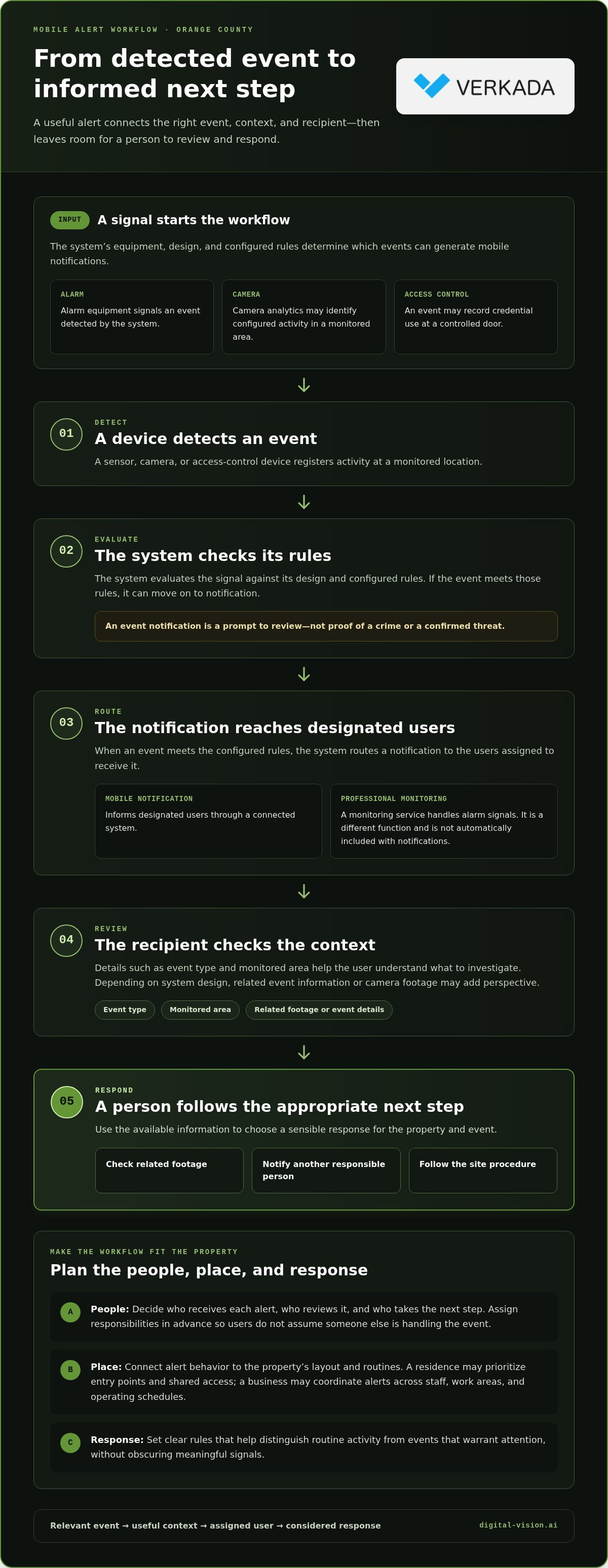
A security system with mobile alerts Orange County property owners can tailor connects security equipment to authorized users and notifies them when configured events occur. The value lies not just in receiving a notification, but in understanding what happened well enough to choose a sensible next step. An alert that identifies the event and monitored area can help a recipient decide whether to review footage, notify another responsible person, or follow a site procedure.
Mobile notifications and professional monitoring are different functions. A notification informs designated users through a connected system; professional monitoring involves a monitoring service handling alarm signals. One does not automatically include the other. Choose an arrangement based on the property’s needs and how people are expected to respond.
Those needs vary across Orange County. A residence in Irvine may prioritize entry points and shared access, while a Beverly Hills business may need to coordinate alerts across staff, work areas, and operating schedules. A tailored design connects alert behavior to how each property is used instead of assuming one setup fits every site.
What can trigger a mobile security alert?
Possible event categories include alarm activation, camera analytics that identify configured activity, and access-control events such as a credential being used. Security alarms bring together components such as sensors, control equipment, and alerting devices; this overview of security alarm systems and components provides useful background. The equipment, system design, and configured rules determine which events generate mobile notifications.
An event notification is a prompt to review, not proof of a crime or a confirmed threat. A camera may flag activity that needs interpretation, and an alarm may require the recipient to check event details. Clear rules can help distinguish routine activity from events that warrant attention, reducing unnecessary notifications without obscuring meaningful signals.
Who benefits from phone alerts at home or work?
At home, alerts can help authorized users stay aware of activity around doors, shared entrances, or other monitored areas when they’re away. Consider who needs access to notifications and who can respond if one arrives. Assigning recipients in advance helps avoid a situation where everyone assumes someone else is handling it.
For a business, alert planning should reflect responsible users, operating hours, and site-specific procedures. An access event may matter differently during open hours than after closing, and not every employee needs the same system access. Establishing who reviews each alert and what happens next makes a security system with mobile alerts Orange County businesses use more practical and orderly. Clear responsibilities turn a notification into a useful part of the site’s response plan.
How mobile alerts move from detection to a useful response
A mobile alert is the endpoint of a process, not the process itself. First, a sensor, camera, or access-control device detects an event. The system evaluates that signal against its design and configured rules. If the event meets those rules, the system routes a notification to designated users. A recipient reviews the available details, then follows the appropriate next step, such as checking related footage or notifying another responsible person.
A useful alert workflow turns a detected event into relevant information for the right user to review and act on. The system’s evaluation and routing rules shape what people see and which events reach them. Notification planning should therefore reflect the property’s routines and response responsibilities, not just the equipment installed.
Context matters. A notification that identifies the event type and monitored area can help a recipient understand what to investigate. Depending on system design, associated camera footage or event details may add useful perspective. An alert still requires judgment: interpret the available information rather than treating every notification as confirmation of a threat.
How cameras, alarms, and access control contribute
Each technology provides a different piece of the picture. Cameras offer visual context for activity in a monitored area. Alarm equipment signals an event detected by the system. Access control records information about entry activity, such as an event at a controlled door. A property may use one or more of these capabilities, depending on its layout and priorities.
When components are integrated, related events can be easier to interpret together. For example, an access event and nearby camera activity may help a user understand what happened at an entrance. Integration doesn’t mean every event is automatically verified; it helps organize relevant information so recipients can review it more effectively. A tailored security system with mobile alerts Orange County users can rely on should connect selected devices to the property’s intended response process.
How to make notifications easier to act on
Start by assigning alert responsibilities. Decide which users need each category of notification, who reviews an event, and who takes the next step. At home, clarify which household members handle entry-related alerts. At a business, responsibilities may differ by role, area, or operating schedule. Avoid routing every event to every user if that makes important messages harder to identify.
Set priorities based on the consequences of an event and the response it requires. Include enough context for recipients to locate and interpret the activity, while keeping routine notifications focused. Then revisit the settings when occupancy, access patterns, staff responsibilities, or business hours change. A configuration that once matched the site may become less useful after a renovation or a change in how spaces are used.
Professional system design and integration can align these steps with the property’s equipment and users. Digital-Vision.AI provides security system design and integration for Orange County properties, connecting selected video surveillance, alarm, and access-control capabilities in a coordinated plan.
Compare mobile-alert security features before choosing a system
A feature can look impressive on a specification sheet yet add little value if it doesn’t fit how a property operates. Compare systems by what they detect, what information users receive, how access is managed, how components work together, and what support is available over time. For a security system with mobile alerts Orange County homes and businesses can use confidently, practical fit matters more than the length of the feature list.
Weigh alert relevance against notification volume and everyday operations. Frequent low-priority notifications may distract users, while overly narrow rules could leave useful activity unreported. The goal is not simply fewer alerts; it’s a considered balance between meaningful coverage and manageable review. Integration also involves more than connecting devices. A unified security ecosystem installation guide can help readers understand how coordinated components fit into a broader design.
Camera analytics or alarm-based notifications?
Camera alerts can provide visual information about activity, while alarm notifications signal that a configured alarm event occurred. Neither approach is automatically better. A camera may help clarify what is happening in a visible area; an alarm event may provide a direct signal from a detection device. In some layouts, reviewing both kinds of information can offer helpful context. Explore AI security camera selection and installation for more detail on camera-system considerations.
What should buyers assess in a mobile-alert experience?
Consider the full user experience: how notifications arrive, whether recipients can understand the event, how they acknowledge or manage it, and what action follows. Check whether assignments make sense for the property’s roles, schedules, and access responsibilities. A homeowner’s needs may differ from those of a business with multiple staff members or operating periods. Include system integration, ongoing maintenance, and support in the comparison, not just app features. A well-matched setup should remain useful as the property’s routines and users change.
Plan a mobile-alert security system around your Orange County property
Start with a simple property map before selecting equipment or setting notification rules. Mark entrances, sensitive areas, shared spaces, detached structures, and the routes visitors or staff commonly take. Then note where camera views could provide useful context. This helps shape a security system with mobile alerts Orange County residents and businesses can use around the way their site functions, instead of relying on a generic layout.
Plan for the layout and use of the property
Consider more than the main entrance. A home may have side gates, a detached garage, or shared access used by household members and visitors. A business may have customer areas, staff entrances, delivery points, and spaces with different access responsibilities. Identify who should receive each type of alert and who is expected to follow up, including household members, staff, or property managers.
For commercial sites, connect notification assignments to operational responsibility. An access event at a staff entrance, for example, may belong with a designated manager, while activity in another area may follow a different procedure. Account for operating schedules and changes in occupancy so alert rules reflect how the site is used at different times.
Check reliability, privacy, and ongoing support
Plan camera views deliberately. Focus coverage on relevant entrances and areas, and avoid unnecessary views into private spaces or neighboring properties. Camera use should also account for applicable California requirements and the specific setting. Define which users can view system information, manage settings, or receive alerts; access should reflect each person’s responsibilities.
Dependable operation involves system health, software updates, and maintenance, not just initial installation. Build periodic review into the plan so equipment, alert assignments, and access permissions can be reconsidered as the property or its users change. A security camera maintenance guide offers further considerations for ongoing system care.
Use this checklist during a professional security assessment:
Map entrances, shared access, detached areas, and sensitive locations.
Mark where camera views could add useful context, while respecting privacy.
Identify who should receive alerts and who is responsible for follow-up.
Note household routines or business schedules that affect alert priorities.
Plan user permissions, system maintenance, and future review of settings.
A professional assessment can turn this map into a coordinated design for cameras, alarms, and access control tailored to your property. Schedule a security assessment with Digital-Vision.AI to plan a mobile-alert system for your Orange County home or business.
Get a professionally designed mobile-alert security system in Orange County
A well-planned mobile-alert system begins with the property, not a preset package. Digital-Vision.AI works with residential and commercial clients across Orange County to assess site priorities, design a tailored security plan, professionally install selected equipment, integrate system components, and provide maintenance and support. Each step helps align detection, notification priorities, and user responsibilities with how the property is used.
That matters because a camera, alarm, or access-control feature is useful when it addresses a real need. The right security system with mobile alerts Orange County property owners choose should reflect their layout, the people who use the site, and the events they need to review. A free security assessment offers a practical starting point for defining those requirements.
What a tailored security assessment should establish
An assessment should clarify the property’s priorities, entry points, shared or sensitive areas, authorized users, and preferred alert responsibilities. A home may need coverage planned around household access and key entrances. A business may require alert assignments that reflect staff roles, work areas, and operating procedures. These details guide equipment selection and help give notifications a clear purpose.
Based on those priorities, a design can bring relevant video surveillance, alarm services, and access-control solutions together. Not every property needs every component. The aim is to select and coordinate what fits, so users can interpret relevant events and understand their role. The assessment is a planning step, not a one-size-fits-all product pitch.
From system design to long-term support
Once the design is established, professional installation puts the selected components in place according to the property plan. Integration can connect appropriate parts of the system, while configuration aligns alert rules and user access with the responsibilities identified during planning. Clear setup helps make the system easier to use day to day.
Security needs can evolve as a home’s occupants, a business’s operations, or a property’s layout changes. Maintenance and technical support help address ongoing system needs and keep the installation aligned with its intended use. Including this support in the plan helps owners think beyond initial setup and consider the system’s longer-term operation.
Digital-Vision.AI provides assessment, custom design, installation, integration, maintenance, and support for Orange County properties. Request your free security assessment to discuss a mobile-alert system designed around your property and the people who rely on it.
Make your next security decision with confidence
The right alert plan should be useful now and adaptable as your property changes. New occupants, shifting business operations, or updated access needs can affect who should receive notifications and how the system supports a response. Treat alert planning as part of an ongoing approach to protecting the spaces and people that matter to you.
For a security system with mobile alerts Orange County residents and businesses can tailor to their priorities, Digital-Vision.AI offers free security assessments and support through security design, professional installation, integration, maintenance, and support. This end-to-end approach helps connect today’s decisions with the system’s long-term use.
Take the next step with a property-focused conversation. Begin your free Orange County security assessment and move toward a security plan shaped around your needs. A thoughtful design can make staying informed clearer and more manageable.
Frequently Asked Questions
Can a security system send mobile alerts without professional monitoring?
Yes, mobile alerts and professional monitoring are separate functions. A connected system may notify its authorized users without a monitoring service, depending on its equipment and setup. In that arrangement, recipients review alerts and decide what action to take themselves. When considering a security system with mobile alerts Orange County property owners can use, distinguish notifications sent to users from a service that receives and handles alarm signals.
Will security camera alerts work if my phone is offline?
Your phone generally can’t receive a real-time notification while it has no connection. Whether the system records an event or makes footage available for later review depends on its design, recording configuration, and available connectivity. Other authorized users may still be reachable if their devices are connected and the system is configured for them. During planning, consider how you’ll check for missed events after reconnecting.
Can multiple people receive alerts from one security system?
Yes, a system can be configured for multiple authorized users, with access organized around their responsibilities. For example, a household might give residents access to relevant alerts, while a small office assigns notifications to a manager and a designated backup. Decide who can view footage, manage settings, or receive particular event updates. Clear permissions help protect sensitive information and prevent uncertainty about who is responsible for follow-up.
Do mobile security alerts include video footage?
Not necessarily. An alert may provide event information without including a video clip; access to footage depends on the camera system, recording setup, and notification configuration. Some systems may let authorized users review related footage separately, subject to connectivity and permissions. If visual context is important, plan how a recipient will locate the relevant camera view and recording instead of assuming every notification contains a clip.
How can I reduce unnecessary security notifications?
Review which events generate alerts and whether camera analytics, activity areas, or schedules can be adjusted to fit normal site activity. For instance, recurring movement in a shared entrance may need different notification rules from activity near a restricted door. Make changes carefully: suppressing too much can hide relevant events. Test adjustments against ordinary routines, then revisit them if occupancy, access patterns, or business hours change.
Can mobile alerts be integrated with cameras, alarms, and access control?
Yes, these capabilities can be brought into an integrated security design when the selected components support the intended operation. A camera may provide visual context, an alarm may signal an event, and access control may show entry activity. Reviewing camera activity alongside a door access event, for example, can help explain what occurred. A professional design can align these components with the property’s priorities and user permissions.
Is a mobile-alert security system suitable for a small Orange County business?
Yes. A small business can use mobile alerts when the system is designed around its entrances, operating routines, and responsible users. A shop in Irvine, for example, may prioritize a staff entrance and assign alerts to people responsible for reviewing them, while a Beverly Hills office may have different access patterns. Digital-Vision.AI serves businesses in Orange County and tailors system design to each site’s needs.
Comments